Word Embeddings and It’s visualizations
Creating Word Vectors
+++ In the last post I have obtained perfect text out of the EU summaries, now the goal is to create word embeddings out of it and visualizing them in tensorboard projector. I am visualizing it right now because I want to know how to do it because I will need to visualize bilingual word embeddings when I create one to see how well the bilingual word embeddings are so that I can fine tune the process to fit best for my case.
For creating word embeddings I will use Gensim’s word2vec model. So, In order to start I first need to see what gensim takes input as. It so happens that it takes words tokens to train word2vec. Hmm, I did not account for that in my previous post and I simply created sentence tokens, well first I need to create word tokens out of the sentences.
I wrote this python code to do the word tokens while preserving the sentences.
import os

load_text =[]  #List to store the loaded text
for root, dirs, files in os.walk("/home/jay/Ready"):
    for file in files:
        if file.endswith('.txt'):
            with open(os.path.join(root, file), 'r') as f:
                contents = f.read()
                contents = re.sub('summary','',contents,flags=re.IGNORECASE)    # Removing the word summary
                words = word_tokenize(contents)
                load_text.append(words)
Now, that I have the data in the format I needed, I will run the word2vec model and create the word embedding
import gensim
import logging

# Here I will be using logging module of python to help me see the progress and statistics.

# Let's configure the logging module
logging.basicConfig(format='%(levelname)s : %(message)s', level= logging.INFO)
It is important to set the logging level to logging.INFO so as to see all the details.
# Now lets declare the embedding size
embedding_size = 4000
Embedding size here means what is the maximum number of features one want to incorporate. So, here as I don’t know what is the best one I selected the size 4000 to account for all the different words it has in the text(I wanted to go for more but my system would not allow it).
# Now lets build the model and run it
word_model = gensim.models.Word2Vec(load_text, size=embedding_size, min_count=5)
There are a lot of options that you can play with in the function but I am satisfied with these. However, there is an option iter (int) if you want to run it for more epochs(default = 5). The min_count argument is to say ignore all the words with total frequency lower than this.
The output will look something like this
NFO : collecting all words and their counts
INFO : PROGRESS: at sentence #0, processed 0 words, keeping 0 word types
INFO : collected 16385 word types from a corpus of 1944658 raw words and 5293 sentences
INFO : Loading a fresh vocabulary
INFO : min_count=10 retains 6442 unique words (39% of original 16385, drops 9943)
INFO : min_count=10 leaves 1916040 word corpus (98% of original 1944658, drops 28618)
INFO : deleting the raw counts dictionary of 16385 items
INFO : sample=0.001 downsamples 47 most-common words
INFO : downsampling leaves estimated 1774595 word corpus (92.6% of prior 1916040)
INFO : estimated required memory for 6442 words and 4000 dimensions: 209365000 bytes
INFO : resetting layer weights
INFO : training model with 3 workers on 6442 vocabulary and 4000 features, using sg=0 hs=0 sample=0.001 negative=5 window=5
INFO : EPOCH 1 - PROGRESS: at 2.38% examples, 35588 words/s, in_qsize 5, out_qsize 0
INFO : EPOCH 1 - PROGRESS: at 4.91% examples, 38060 words/s, in_qsize 6, out_qsize 0
INFO : EPOCH 1 - PROGRESS: at 8.99% examples, 42107 words/s, in_qsize 5, out_qsize 0
INFO : EPOCH 1 - PROGRESS: at 12.34% examples, 44613 words/s, in_qsize 5, out_qsize 0
INFO : EPOCH 1 - PROGRESS: at 15.95% examples, 45907 words/s, in_qsize 5, out_qsize 0
INFO : EPOCH 1 - PROGRESS: at 19.06% examples, 45430 words/s, in_qsize 5, out_qsize 0
INFO : EPOCH 1 - PROGRESS: at 22.46% examples, 45774 words/s, in_qsize 5, out_qsize 0
INFO : EPOCH 1 - PROGRESS: at 25.17% examples, 45869 words/s, in_qsize 5, out_qsize 0
INFO : EPOCH 1 - PROGRESS: at 28.19% examples, 46279 words/s, in_qsize 5, out_qsize 0
INFO : EPOCH 1 - PROGRESS: at 31.21% examples, 46555 words/s, in_qsize 5, out_qsize 0
INFO : EPOCH 1 - PROGRESS: at 34.39% examples, 46034 words/s, in_qsize 5, out_qsize 0
INFO : EPOCH 1 - PROGRESS: at 37.29% examples, 46612 words/s, in_qsize 5, out_qsize 0
INFO : EPOCH 1 - PROGRESS: at 39.90% examples, 46921 words/s, in_qsize 5, out_qsize 0
INFO : EPOCH 1 - PROGRESS: at 42.32% examples, 46297 words/s, in_qsize 5, out_qsize 0
INFO : EPOCH 1 - PROGRESS: at 45.59% examples, 46329 words/s, in_qsize 5, out_qsize 0
INFO : EPOCH 1 - PROGRESS: at 50.48% examples, 46561 words/s, in_qsize 5, out_qsize 0
INFO : EPOCH 1 - PROGRESS: at 54.17% examples, 46626 words/s, in_qsize 5, out_qsize 0
INFO : EPOCH 1 - PROGRESS: at 57.08% examples, 46427 words/s, in_qsize 4, out_qsize 1
INFO : EPOCH 1 - PROGRESS: at 60.25% examples, 46679 words/s, in_qsize 5, out_qsize 0
INFO : EPOCH 1 - PROGRESS: at 63.78% examples, 46823 words/s, in_qsize 5, out_qsize 0
INFO : EPOCH 1 - PROGRESS: at 65.84% examples, 46732 words/s, in_qsize 5, out_qsize 0
INFO : EPOCH 1 - PROGRESS: at 68.77% examples, 46813 words/s, in_qsize 5, out_qsize 0
INFO : EPOCH 1 - PROGRESS: at 71.74% examples, 46913 words/s, in_qsize 5, out_qsize 0
INFO : EPOCH 1 - PROGRESS: at 74.46% examples, 46662 words/s, in_qsize 5, out_qsize 0
INFO : EPOCH 1 - PROGRESS: at 77.82% examples, 46772 words/s, in_qsize 5, out_qsize 0
INFO : EPOCH 1 - PROGRESS: at 80.54% examples, 46766 words/s, in_qsize 5, out_qsize 0
INFO : EPOCH 1 - PROGRESS: at 83.49% examples, 46776 words/s, in_qsize 5, out_qsize 0
INFO : EPOCH 1 - PROGRESS: at 86.49% examples, 46701 words/s, in_qsize 6, out_qsize 0
INFO : EPOCH 1 - PROGRESS: at 89.55% examples, 46858 words/s, in_qsize 5, out_qsize 0
INFO : EPOCH 1 - PROGRESS: at 92.42% examples, 46847 words/s, in_qsize 5, out_qsize 0
INFO : EPOCH 1 - PROGRESS: at 94.90% examples, 46808 words/s, in_qsize 6, out_qsize 0
INFO : EPOCH 1 - PROGRESS: at 98.11% examples, 46949 words/s, in_qsize 4, out_qsize 0
INFO : worker thread finished; awaiting finish of 2 more threads
INFO : worker thread finished; awaiting finish of 1 more threads
INFO : worker thread finished; awaiting finish of 0 more threads
Let’s see our vocab size
#length of vocab
len(word_model.wv.vocab)
6642
Now that model is trained I would save the model so that I can resume it from here and I don’t have to do this all over again.
# Save the model
word_model.save('english')
which will inform you of all the various things it saves
INFO : saving Word2Vec object under english, separately None
INFO : storing np array 'vectors' to english.wv.vectors.npy
INFO : not storing attribute vectors_norm
INFO : storing np array 'syn1neg' to english.trainables.syn1neg.npy
INFO : saved english
Visualizing the word embedding in Tensorboard
+++
Tensorboard is a visualizing tool that is used with tensorflow to visualize certain parameters on the go to see how well the model is performing or visualize word embedding in 3D space.
The problem here is that the model I saved and the is not what tensorboard is familiar to work with so I had to convert this word vectors to a format that tensorboard understands.
This is a little difficult but there is a script written by BrikerMan which is open source and it does the thing I want.
import sys, os
from gensim.models import Word2Vec
import tensorflow as tf
import numpy as np
from tensorflow.contrib.tensorboard.plugins import projector

def visualize(model, output_path):
    meta_file = "w2x_metadata.tsv"
    placeholder = np.zeros((len(model.wv.index2word), 4000))

    with open(os.path.join(output_path,meta_file), 'wb') as file_metadata:
        for i, word in enumerate(model.wv.index2word):
            placeholder[i] = model[word]
            # temporary solution for https://github.com/tensorflow/tensorflow/issues/9094
            if word == '':
                print("Emply Line, should replecaed by any thing else, or will cause a bug of tensorboard")
                file_metadata.write("{0}".format('<Empty Line>').encode('utf-8') + b'\n')
            else:
                file_metadata.write("{0}".format(word).encode('utf-8') + b'\n')

    # define the model without training
    sess = tf.InteractiveSession()

    embedding = tf.Variable(placeholder, trainable = False, name = 'w2x_metadata')
    tf.global_variables_initializer().run()

    saver = tf.train.Saver()
    writer = tf.summary.FileWriter(output_path, sess.graph)

    # adding into projector
    config = projector.ProjectorConfig()
    embed = config.embeddings.add()
    embed.tensor_name = 'w2x_metadata'
    embed.metadata_path = meta_file

    # Specify the width and height of a single thumbnail.
    projector.visualize_embeddings(writer, config)
    saver.save(sess, os.path.join(output_path,'w2x_metadata.ckpt'))
    print('Run `tensorboard --logdir={0}` to run visualize result on tensorboard'.format(output_path))

if __name__ == "__main__":
    """
    Just run `python w2v_visualizer.py word2vec.model visualize_result`
    """
    try:
        model_path = sys.argv[1]
        output_path  = sys.argv[2]
    except:
        print("Please provice model path and output path")
    model = Word2Vec.load('/home/jay/Saved_Models/english/english')
visualize(model, '/home/jay/Saved_Models/english/')
The script is very simple, what it does is, it takes the model I saved and makes a placeholder object of the size of my embeddings and starts writing tensorflow summary and checkpoints.
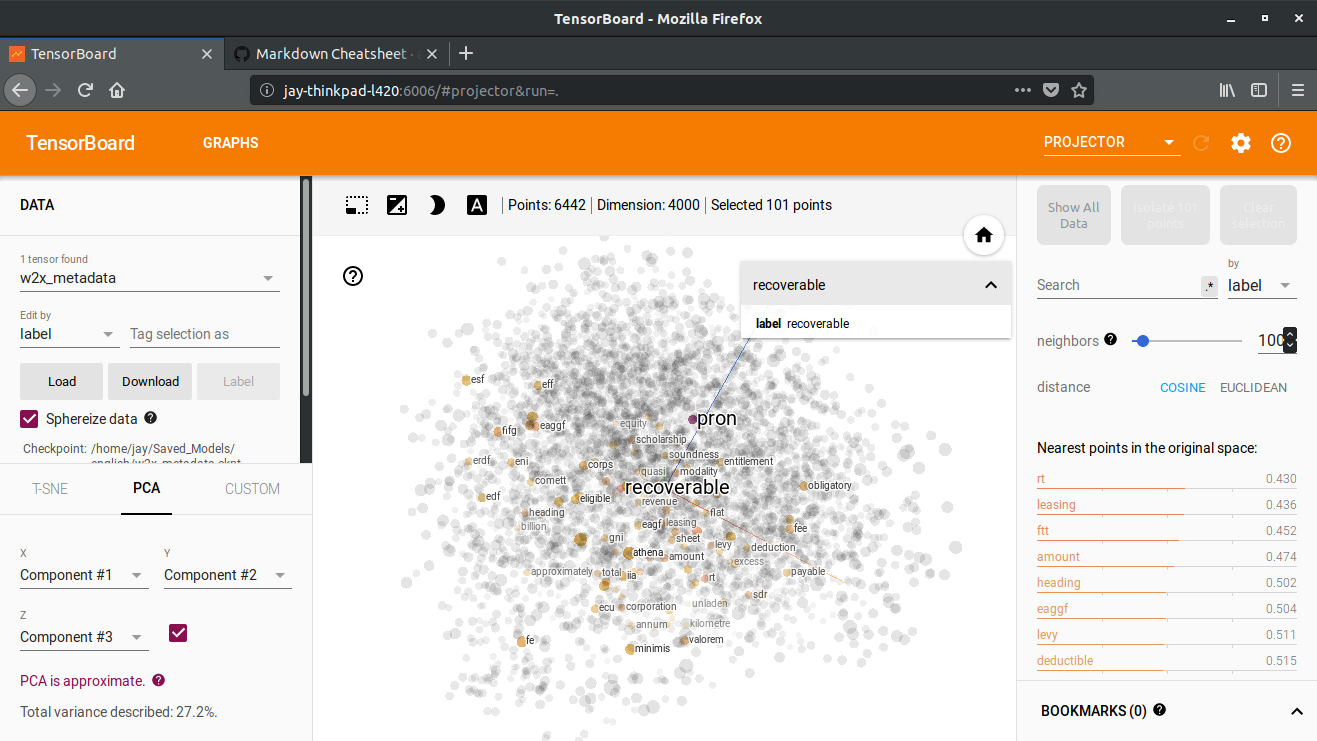
Well after a little tweaking I got it to work and the results is